
Rewind the bug. Watch it happen.
Scrub through the visit that led to a report, with the page, console and network in sync.
A replay shows what your tester did before reporting a problem, next to the console and request evidence that was actually recorded. It is built for debugging one bug, not for analysing every visitor.
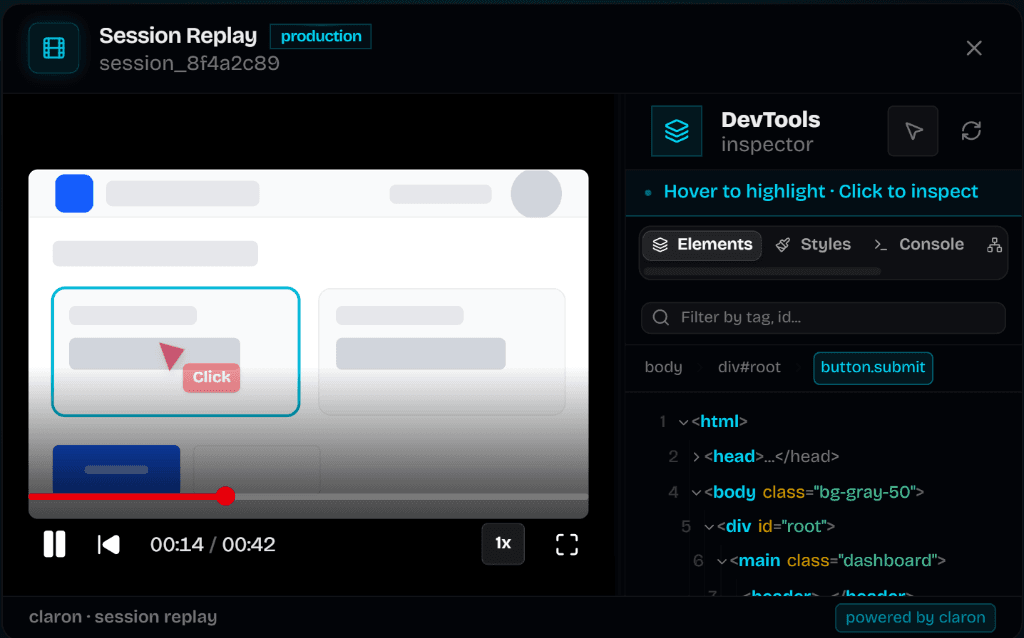
What you can inspect
Seek through the timeline and change playback speed. Open the recorded clicks, console and request panels to see the context at that moment.
- Select a recorded click to jump to it.
- Inspect the captured element in the DOM inspector, as it was when it was recorded.
- See console and network entries for the capabilities that were enabled.
- Follow a request into your server with backend evidence, where it is set up.
Recorded where the review happens
Recording starts with a hosted review session, or in the browser extension when Record Session Replays is allowed for the device and project. Make a short test action first and check the replay before reproducing the bug.
A replay shows what was recorded. It does not re-run the original requests.
Export it, open it locally
Download a replay as a file, then open a supported .json or .json.gz recording in Claron's local player. The local player reads it in your browser without creating a new cloud recording.
Privacy first
Recordings can contain application text and data, so review with dedicated test accounts. Project diagnostic permissions control who can open cloud evidence; a downloaded file is a separate copy, so share it only with authorized people.
Questions about session replay
Straight answers, including the limits.
Set it up
More of Claron
- Visual bug reportingReport a bug by clicking the page. Claron attaches a screenshot, console logs, network requests, element and source context to the report.
- Backend debuggingFollow a reported request into your server: the functions it called, the branches it took, the error it threw. Encrypted, and unlocked only on your devices.
- Live website reviewsReview a website together: invite clients as guests, guide everyone to the same page and collect visual bug reports with their evidence attached.
- Review rounds and sign-offCollect sign-off on a specific build: invite reviewers to selected pages, record each approval or change request, then verify fixes on the fixed version.
- AI fixes, CLI and MCPClaron reads a bug report's evidence, explains the cause and proposes a diff. Apply it with the CLI, open a pull request, or hand it to your agent via MCP.
Weighing up other tools?
See how Claron compares with Marker.io, BugHerd and Sentry across the whole workflow.